
Online FERPA Management
Manage Your FERPA Student Record Release Online
You can manage your Student Record Release quickly and securely through your Student Portal. There’s no need to visit the Registrar’s Office or complete a paper FERPA form — everything can be done online, anytime, anywhere.
The Student Record Release allows you to control who has access to your education records. Add or remove individuals in just a few clicks.
How to Use the Online Student Record Release
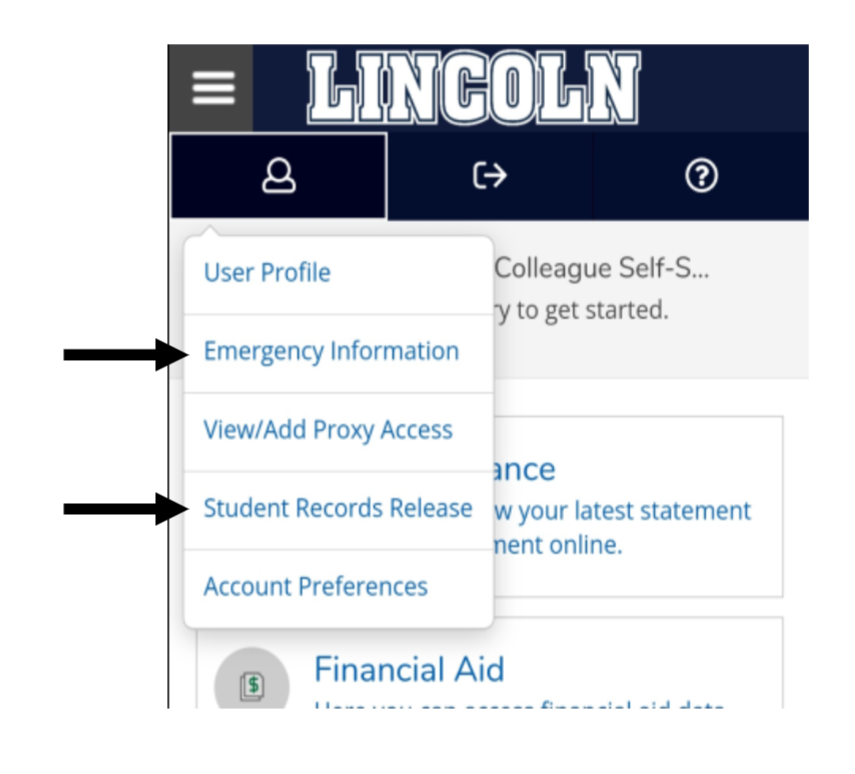 Follow these steps to manage access to your records:
-
Log in to your Student Portal.
-
Select Self-Service.
-
Click the person icon at the top of the page.
-
Choose Student Record Release from the drop-down menu.
-
Add or remove people as needed.
Important to Know:
- Completing a Student Record Release is optional. However, some organizations — such as Greek Life or scholarship committees — may require it.
- You can also update your address and add emergency contacts by clicking the person icon in your portal.
Questions? Contact the Registrar’s Office at Registrar@LincolnU.edu.