
This app helps you stay on track by providing easy access to resources, connecting you with the right support offices, and giving you the tools to take charge of your academic journey.
Navigate360 for Students

Help? Just Raise Your Hand!
At Lincoln University, we know that finding the right person to ask for help isn’t always easy. That’s why we’ve made it simple with Navigate360’s Hand Raise feature.
Whether you have a question about classes, financial aid, housing, or anything else that could impact your success, you can submit a Hand Raise right in Navigate360. Your message goes directly to the Lincoln team who can best assist you — and we’ll reach out quickly to provide the support you need to stay on track.
Your success starts with a single click — just raise your hand!
Navigate360 Quick Start Guide
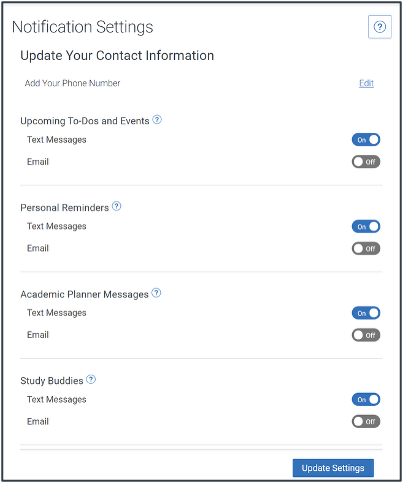 Choose the Account button on your app or on the desktop site.
- Select Notification Settings. Scroll to find content categories such as Study Buddies
- Select your preferred method of notification.
Note: You can select as many notification methods as desired, but you receive multiple notifications if you choose more than one. - If you select the Text option, ensure that your cell phone number is accurate in Navigate360. You can do this by choosing Edit next to Add Your Phone Number.
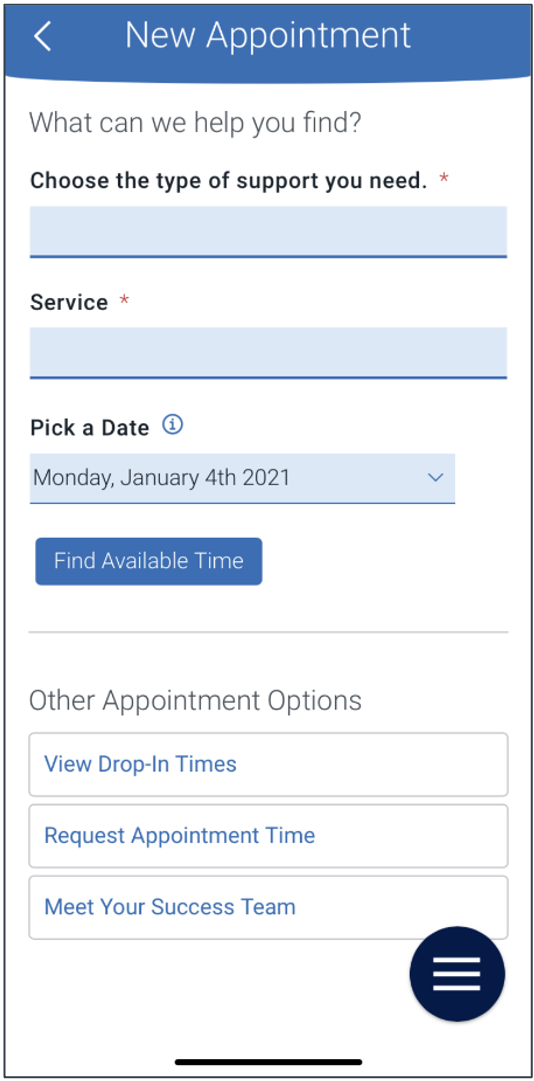 To schedule appointments, click the purple Appointments icon on the left navigation menu and answer questions about your preferred service, date, time, and location.
Other Appointment Options
You can also view available drop-in times or request appointment times for your preferred service.
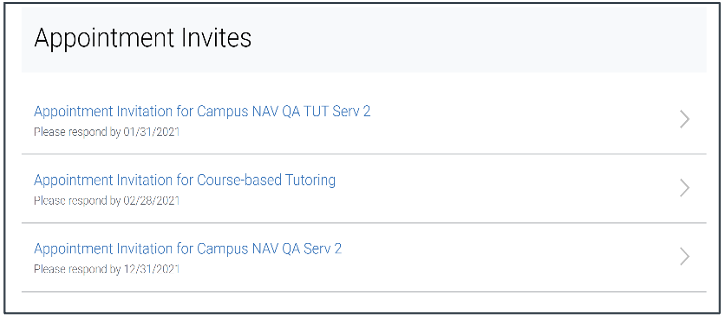
Appointment Invitations
Your Success Team (e.g., assigned advisors, instructors) may also request you meet with them. When this happens, you receive an appointment invitation where you only need to choose a time that works for you!
Need Help?
Questions? Email Navigate@LincolnU.edu.
For technical assistance, email Helpdesk@LincolnU.edu.